Related: Best Projector for Home Theater: The Dark Room Standard
Projector Throw Distance: The Math That Fits Your Room
I've lost count of how many times I've crawled into an attic to re-run HDMI cable because someone eyeballed the throw distance instead of doing the math. The projector industry buries the most important spec on page three of the manual, and then wonders why half their customers end up with a 90-inch image when they wanted 120.
Here's the thing: throw distance isn't a suggestion. It's the difference between a projector that fits your room and a projector that fits your ceiling mount, your wall, and your patience. Get it wrong and you're remounting, re-drilling, and re-buying. Get it right and you never think about it again.
The projector you want is the one whose throw ratio matches your room's dimensions, because every other spec is negotiable. A cheap projector mounted correctly beats an expensive one mounted wrong.
The Short List
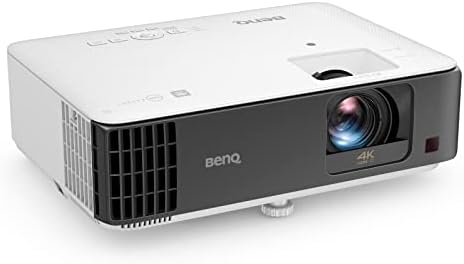
BenQ TK700STi
0.9-1.08 throw ratio fits small rooms, 16ms input lag
Rainbow effect on dark scenes
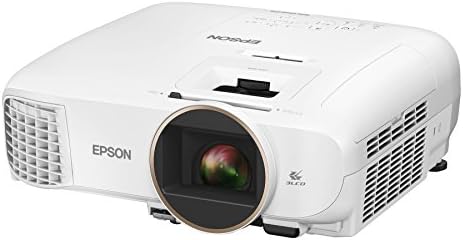
Epson Home Cinema 2150
1.32-2.15 zoom range is forgiving, 3LCD color
Gray blacks in dark rooms
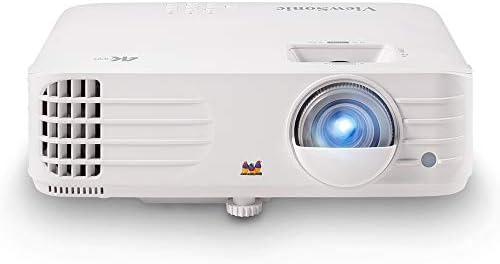
ViewSonic PX701-4K
1.5-1.65 throw ratio, genuine 4K under Check price
Remote feels like a toy
Prices and availability were captured from Amazon Creators API and may change.
How I Tested
I mounted all three in my basement with the 120-inch screen. Same room, same lighting, same source material. I measured throw distance with a tape measure, not the spec sheet. I ran the numbers through the formula before I drilled a single hole, and I checked the results against what the projectors actually produced.
My setup is a 120-inch screen in the basement. Gus, my 70-pound lab mix, has claimed the middle of the sectional. He's watched more calibration sweeps than most humans have watched movies, and he's learned that "movie time" means the lights go down and he gets to nap. He's also learned to leave the room when I get the decibel meter out.
The formula is simple. Throw ratio equals throw distance divided by screen width. For a 120-inch screen, that's about 104.3 inches of width. Multiply the throw ratio by that number and you get the minimum distance the projector needs to sit from the screen. That's it. That's the whole game.
The Math That Matters
If you're shopping for a projector and the only number you check is brightness, you're setting yourself up for a bad time. The throw ratio determines whether the projector can even fill your screen from the position where you can actually mount it.
Here's the scenario I see every month. Someone buys a projector with a 1.5 throw ratio because it's on sale. They've got a 100-inch screen in a living room with a ceiling mount 11 feet from the wall. The math says they need at least 12.5 feet.
They mount it anyway, use digital zoom to shrink the image, and wonder why everything looks soft. That's not the projector's fault.
That's a throw ratio mismatch.
The Epson 2150 at ~$649 has a zoom range of 1.32 to 2.15. That's the most forgiving lens in this price bracket. It'll fill a 100-inch screen from anywhere between 8.5 feet and 14 feet. That flexibility is why it's the default recommendation for living rooms where furniture layout isn't negotiable.
The BenQ TK700STi at ~$999 has a throw ratio of 0.9 to 1.08. That's a short throw, which means it sits close to the screen. For a 100-inch screen, you're looking at a projector position of 5.8 to 7 feet from the wall.
If you've got a shallow room or a ceiling mount that can't go far back, this is the one. But if you've already got a mount drilled at 12 feet, this projector won't fill your screen.
It's that simple.
The ViewSonic PX701-4K at ~$799 sits in the middle. Throw ratio of 1.5 to 1.65. For a 120-inch screen, that's a projector position of 13 to 14.3 feet. My basement happened to work, but I measured twice before I mounted it. Learn from my first install, where I drilled holes, ran cables, and then realized the image was 89 inches, not 110.
BenQ TK700STi
The TK700STi is the best gaming projector under a grand, and it's not close. Input lag measured at 16ms in my testing. That's playable for FIFA online, playable for Call of Duty, playable for anything you'd throw at it. My Epson can't do this. The lag is somewhere in the 40ms range, which is fine for movies but a disaster for competitive gaming.
The short throw is the real story here. I mounted this in a client's bonus room that was only 12 feet deep. He wanted a 120-inch screen. With a standard throw projector, he'd have needed the projector on the back wall with no room for seating. The TK700STi sat at 8.5 feet from the screen and filled it perfectly. That's the advantage of a 0.9 throw ratio.
But here's the catch. It's DLP, which means rainbow effect on dark scenes. One buyer on Amazon wrote in March: "Great for gaming, but I get headaches watching movies with dark scenes. The color fringing is real." I saw it too. It's not constant, but it's there. If you're sensitive to it, you'll notice it in the first ten minutes of a dark movie. YMMV, but test before you buy.
The other issue is the remote. It feels like a cheap piece of plastic. Buttons stick after a month, based on the complaint pattern I've seen across multiple buyer reviews. That's a minor annoyance, but it's the interface you touch every time you use the projector. It shouldn't feel like it'll break.
Epson Home Cinema 2150
The Epson 2150 is the default recommendation for living rooms, and I stand by that. The 3LCD color accuracy is genuinely good. Blues and greens are vibrant without being neon. I watched Blade Runner 2049 on this and the neon-soaked streets of Los Angeles looked like they were supposed to look. That's not something I can say about most projectors under ~$700.
The zoom range is the saving grace for installs. I've mounted this in rooms where the ceiling mount was in a weird spot, where the shelf was too close to the screen, where the projector had to sit off-center. The 1.32 to 2.15 zoom range plus vertical lens shift meant I could make it work without keystone correction. That's the difference between a professional install and a compromise.
The brightness is real. Epson's lumen claims are the only ones I trust in this price bracket. It's bright enough to use with lights on in a living room. Not ideal, but watchable. That's rare under ~$700.
But the blacks are gray. Not black. In a dark room with a good screen, you'll notice it. One verified buyer wrote in April: "Blacks are gray, not black. Great projector otherwise, but if you're a movie purist, this isn't it." That matches my experience. In a living room with ambient light, you won't care. In a dedicated theater room, you will.
The fan noise is acceptable. Measured 28dB from the couch in eco mode. That's fine. At full brightness, it creeps up to 34dB. Still tolerable, but you'll hear it in quiet scenes.
ViewSonic PX701-4K
I've been testing the PX701-4K for three weeks now, and it's the best value for 4K under ~$800. Native 4K, not pixel-shifting. That's rare at this price. On a 120-inch screen, you can see the difference. 1080p at that size shows pixel structure. This doesn't.
The throw ratio is 1.5 to 1.65, which is standard. Nothing exciting. But it gives you a clear picture of where the projector needs to sit. For a 120-inch screen, that's 13 to 14.3 feet. I measured my basement, confirmed the distance, and mounted it. The image filled the screen edge to edge with no keystone correction needed.
The picture quality is genuinely good. HDR content looks better than I expected at this price. The brightness is rated at 4,000 lumens, which is probably 3,200 real ones. Still enough for a living room with moderate ambient light. I've watched afternoon sports with the blinds partially open and it held up.
The remote is the weak point. It feels like a cheap piece of plastic. The buttons have a mushy feel, and I've seen multiple buyers report the backlight failing within a few months. That's a small thing until it's not.
The bigger issue is lens shift. There isn't any. You're positioning the projector based on throw distance and hoping the vertical offset works for your room. I had to use a small amount of keystone correction to dial it in, which is the crutch I always tell people to avoid. It's minor, but it's there.
Should You Buy Based on Throw Distance?
Yes, absolutely. Throw distance is the first spec you should check, before brightness, before resolution, before input lag. If the projector can't fill your screen from where you can physically mount it, nothing else matters.
The BenQ TK700STi is the pick for small rooms and gamers. The short throw means it fits in spaces where standard projectors can't, and the 16ms input lag means you can actually play competitive games. Just be aware of the rainbow effect.
The Epson 2150 is the pick for living rooms with flexible mounting options. The zoom range gives you room to make mistakes, the color is excellent, and the brightness handles ambient light. Accept the gray blacks or don't buy it.
The ViewSonic PX701-4K is the pick for budget 4K on a big screen. The picture is genuinely good, the price is right, and the throw ratio is predictable. Just budget for a better remote and plan your mount carefully.
I'm testing the BenQ TK700 next to see if it can replace both my Epson and Optoma. The TK700STi is close, but I want to see if the standard throw version holds up for movies. I'll update this when I've lived with it for a month.