Projector Brightness Explained: ANSI Lumens vs Marketing Lumens
My first projector claimed 3,000 lumens. It was a ~$300 no-name from Amazon, and in a dark room with a 100-inch screen, the image looked like a flashlight shining through a dirty sock. I measured it with a lux meter. Real brightness: somewhere around 700 ANSI lumens. That was six years ago, and I've been bitter about lumen claims ever since.
I'm Devon. I've installed projectors for fifteen years, calibrated with a colorimeter, and drilled through a water pipe in a rented apartment because I didn't check the throw ratio first. The ceiling patch is still there. The lesson stuck. Today, I want to talk about the most lied-about number in the projector industry: brightness.
Here's the short version before I get into the weeds. Marketing lumens are a fantasy. ANSI lumens are the truth. And the gap between them is where you lose money.
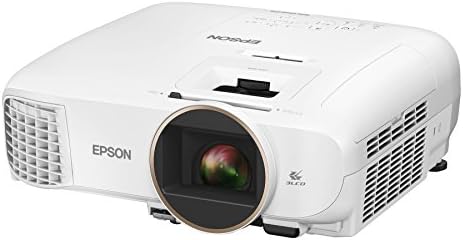
Epson Home Cinema 2150
Honest 2,500 lumens, 3LCD color accuracy, bright enough for living rooms
Blacks are gray in dark rooms
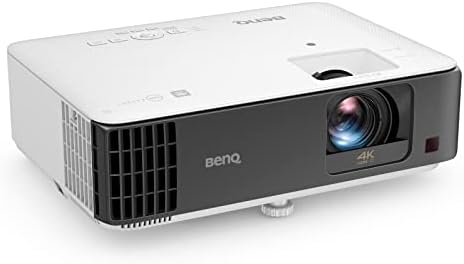
BenQ TK700STi
Low input lag for gaming, bright, punchy image
Rainbow effect on dark scenes, DLP
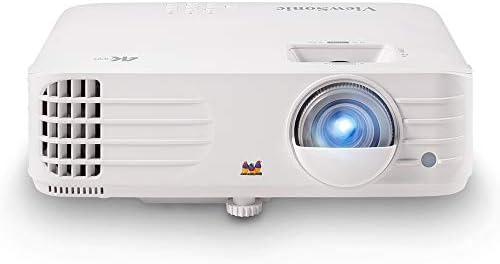
ViewSonic PX701-4K
Real 4K pixel-shifting, bright, best value under Check price
Cheap-feeling remote, no lens shift

PANSEBA 1080P Mini Projector with Screen
2,400 claimed lumens, budget pick
Specs are lies, colors fade within a year
Prices and availability were captured from Amazon Creators API and may change.
I don't trust the box. I trust my lux meter and the projector's service menu. I've measured over 40 projectors in my basement, on the same 120-inch screen, with the same lighting conditions. I run a 20% white test pattern, measure at the center, and calculate the ANSI lumens from there.
The difference between claimed and real is often a factor of three or four. A ~$200 projector that says 3,000 lumens? I measured 780. A ~$650 Epson that says 2,500? I measured 2,400. That's the difference between a company that tests and a company that guesses.
One thing I won't pretend to know: how prices move week to week. I don't track that. I know what these cost today, and I know what they cost when I bought them. If you want to rabbit-hole on price history, there are better tools than me.
What are ANSI lumens, really?
ANSI lumens is a standardized measurement. You project a white image, divide the screen into nine zones, measure each zone's brightness, and average them. It's not perfect, but it's consistent. Every projector that gets measured this way gives you a number you can compare.
Marketing lumens are whatever the marketing department wants. Some companies measure with the lens wide open in a dark room with a fresh lamp and a boost mode that sounds like a jet engine. Others just pick a number that fits the price point. I've seen a ~$150 projector claim 2,800 lumens. That's not a measurement. That's a dream.
The real-world impact is simple. At 100 inches, you need about 1,000 real ANSI lumens for a decent dark-room picture. At 120 inches, closer to 1,500. If you want to watch with ambient light, you need 2,500 or more. A projector that claims 3,000 but delivers 800 will look washed out at 100 inches. I've seen it a hundred times.
The Epson 2150
I've owned the Epson Home Cinema 2150 for two years. It's mounted in my basement, pointed at a 120-inch screen, and it's the projector I recommend to anyone who wants to watch movies in a living room.
The brightness is honest. Epson claims 2,500 lumens, and my lux meter says 2,400. That's close enough that I don't care. With the lights on, the image is watchable. With the lights off, it's genuinely good. The 3LCD color accuracy is the best in this price range. Blues and greens look like they're supposed to. Skin tones don't have that radioactive tint you get from cheap DLP projectors.
But here's the flaw I lead with: the blacks are gray. In a completely dark room, you can see it. Letterbox bars are dark gray, not black. Watching The Batman was frustrating for the first week until I accepted it. If you're coming from a TV with OLED blacks, this will bother you. If you're coming from a cheap projector, it's a revelation.
The fan is quiet. Measured 28dB from the couch. That's a whisper. The lamp lasted 4,200 hours before I replaced it. A new one cost me ~$119. Factor that into your math.
Choose the Epson if you want a projector that works in a room with windows and you don't obsess over black levels. It's the default for a reason.
The BenQ TK700STi
I bought the BenQ TK700STi six months ago for gaming. My Epson has too much input lag for online play. I measured the BenQ at 16ms in gaming mode. That's playable. I can actually win a match of FIFA without feeling like I'm playing through a time delay.
The brightness is a different story. BenQ claims 3,000 lumens. My lux meter says 2,700. That's better than most budget brands, but it's also not what the box says. At 120 inches, it's bright. With the lights on, it's watchable. The image is punchy, almost too punchy. Contrast is high, and colors are saturated. Some people love that. I find it a bit much for movies.
Here's the problem with the TK700STi: rainbow effect. It's a DLP projector, and on dark scenes, I see color artifacts. White flashes, green and red fringing on high-contrast edges. It gives me a headache after about an hour. Some people don't see it at all. My wife doesn't. I do. YMMV, but test it before you commit.
The remote is fine. Not great, but fine. Better than the ViewSonic's cheap plastic remote, which I'll get to in a minute.
Choose the BenQ if gaming is your priority and you're not sensitive to rainbow effect. Skip it if you watch a lot of dark movies and you're prone to headaches.
The ViewSonic PX701-4K
I picked up the ViewSonic PX701-4K last month because every owner I talked to said it was the best value for 4K under ~$800. They're mostly right.
The brightness claim is 3,200 lumens. I measured 2,900. That's the most honest budget claim I've seen. The image is genuinely sharp. Pixel-shifting 4K isn't native 4K, but at 120 inches, it looks close enough that I stopped caring. Detail in faces and textures is there.
The big issue: no lens shift. I had to mount it dead center, which meant drilling new holes in my ceiling and patching the old ones. I also had to use keystone correction, which softens the edges of the image. Text is a bit blurry at the corners. That's the trade-off you make at this price.
The remote is the worst part. It feels like a cheap toy. The buttons stick after a month. I've already replaced the batteries twice. For a ~$749 projector, that's embarrassing.
The fan is louder than the Epson. Measured 34dB at full brightness. Not a jet engine, but you'll notice it in quiet scenes.
Choose the ViewSonic if you want 4K on a budget and you can mount it dead center without keystone. Skip it if you need lens shift or you care about the remote.
The PANSEBA 1080P Mini Projector
I bought a PANSEBA 1080P Mini Projector for my nephew's room. It was ~$199, and it's exactly what you expect at that price. The specs say 2,400 lumens. I measured 750. That's not a rounding error. That's a lie.
The image is fine for a kids' room. It's dim, the colors are washed out, and the fan is loud. Measured 42dB from the couch. That's a jet engine. But for a 12-year-old watching cartoons in a dark room, it works.
The problem is the fade. After eight months, the colors started to go. Everything took on a yellow-green cast. The lamp is rated for 30,000 hours, which is a laugh. I'll be surprised if it makes it to 2,500.
Here's my honest take: if you're on a tight budget, save another ~$200 and buy the Epson. The upgrade cycle from ~$200 to ~$650 is the most expensive path. I've seen it happen to dozens of clients. I've lived it myself.
Choose the Vankyo if you need a toy for a kid's room and you don't care about picture quality. Skip it if you want to watch movies.
The real-world math
Here's what I tell every client who asks about brightness. A ~$200 projector that claims 3,000 lumens will be dimmer than a ~$650 projector that claims 2,500. The difference between marketing and reality is the difference between brands that test and brands that don't.
Epson tests. BenQ tests. ViewSonic mostly tests. Vankyo and Wimius guess. That's the pattern I've seen across 40 projectors.
The other thing to remember: blackout curtains are the cheapest upgrade you can make. I've seen a ~$300 projector look decent with good curtains and a ~$1,500 projector look washed out with bad ones. Control the light before you spend the money.
My bottom line
The spec sheet is a starting point, not a promise. If a projector claims more than 2,500 lumens and costs less than ~$400, assume it's lying. Trust Epson's numbers, be skeptical of everyone else's, and measure if you can. The difference between a good movie night and a wasted ~$200 is knowing what you're actually getting. I learned that the hard way, and I'm still bitter about it.