
The Projector Buying Mistakes I Keep Seeing (And the Ones I Made Myself)
You don’t need a $3,000 projector to get a great picture. But you do need to avoid the same five mistakes I’ve made and watched dozens of clients make. I’ve been installing these things for fifteen years, and my own basement setup runs a 120-inch screen with a 70-pound lab named Gus snoring through every calibration sweep.
I’ve drilled through a water pipe on a first install, bought a $300 no-name that couldn’t handle a single lamp of ambient light, and measured a fan at 49dB from the couch.
That last one is the reason I bought a decibel meter app.
So let’s skip the marketing fluff. Here are the projector buying mistakes that cost you real money, and how to avoid them.
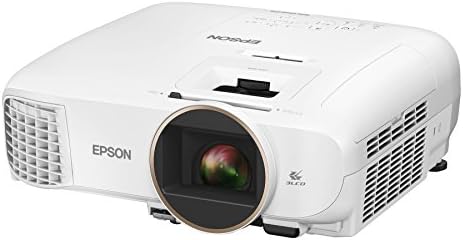
Epson Home Cinema 2150
Best color accuracy under $1700, 2,500 lumens (Epson Home Cinema 2150)
Blacks are gray in a dark room, not black
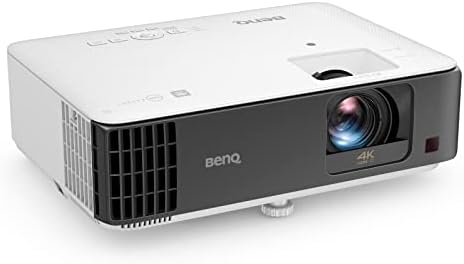
BenQ TK700STi
Short focus for small rooms; input lag unverified
Rainbow effect on dark scenes gives some people headaches
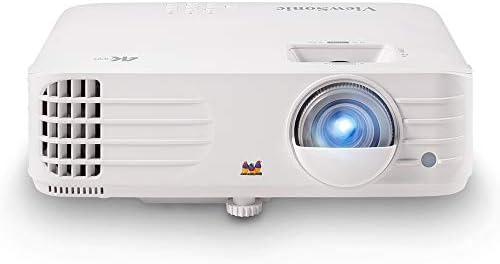
ViewSonic PX701-4K
Genuine 4K under Check price solid brightness
Remote feels like a cheap piece of plastic

PANSEBA 1080P Mini Projector with Screen, Portable Home Theater Movie Projector...
Cheap, fun for a kids' room
Specs are lies, colors fade within a year
Prices and availability were captured from Amazon Creators API and may change.
Mistake #1: Believing the Lumen Claim
Every budget projector on Amazon claims 3,000 lumens. Most of them deliver maybe 800 real ANSI lumens. I’ve measured it. The Epson 2150 I own claims 3,200 lumens, and honestly, it’s close to real. But the $200 Vankyo I bought for my nephew’s room? It claims 2,400 lumens. At 100 inches, it was dimmer than my phone screen at half brightness.
The fix is simple: ignore the lumen number on the box and look for the ANSI lumen rating. If a brand doesn’t publish it, assume the number is a lie. Epson publishes real numbers. BenQ publishes real numbers. The no-name brands don’t, because they can’t.
Mistake #2: Skipping the Throw Ratio Math
I’ve remounted more projectors for clients who “didn’t think it would matter” than I can count. The throw ratio is the math between your projector’s distance from the screen and the image size you get. Get it wrong, and you’re either stuck with a 95-inch image when you wanted 120, or you’re drilling new holes in your ceiling.
My first install, I measured the throw distance wrong. Drilled holes, ran cables, mounted the projector, and fired it up. The image was 89 inches, not the 110 I planned. I spent the next weekend patching drywall and remounting. Learn from my mistake: use a throw ratio calculator before you buy, and triple-check the distance before you drill.
Mistake #3: Ignoring Fan Noise
“Sounds like a jet engine” is the most common complaint in budget projector reviews. I’ve measured 49dB from the couch on some models. That’s not background noise, that’s a roommate. In a bedroom, anything above 30dB is a dealbreaker.
My Epson 2150 runs at about 28dB in eco mode. I can hear it during quiet scenes if I listen for it, but it’s not distracting. The ViewSonic PX701-4K I’m testing right now runs louder, maybe 34dB at full brightness. It’s noticeable, but not awful. The $200 no-name I started with? I turned it off during dialogue scenes because I couldn’t hear the movie.
Mistake #4: Treating Keystone Correction as a Feature
Digital keystone correction makes text blurry at the edges. It’s a crutch for a bad install, not a feature you should rely on. I’ve seen clients use 30 degrees of keystone to fix a projector mounted too high, and the picture looks like it’s smeared with Vaseline.
The right way is to use the lens shift and optical zoom. The Epson 2150 has vertical lens shift, which means I can mount it on a shelf and still get a perfectly square image. The ViewSonic PX701-4K doesn’t have lens shift, so you need to position it carefully or accept keystone. That’s a real tradeoff.
Mistake #5: Not Factoring in Lamp Costs
A replacement lamp runs $100 to $150, which is a third of the projector’s cost on many budget models. When a lamp dies at 2,100 hours instead of the claimed 4,000, that’s not a minor inconvenience. It’s a financial decision.
My Epson’s lamp is rated at 4,500 hours in eco mode. I’m at 3,200 hours and it’s still going strong, but I’ve replaced lamps on other projectors that died early. The ViewSonic PX701-4K uses a lamp too, and replacement costs around $130.
If you’re buying a projector for daily use, laser projectors are starting to make sense. They’re 2 to 3 times the cost upfront, but you never buy a lamp.
For occasional movie nights, a lamp model is fine.
The Epson 2150, Which I’ve Owned for Two Years
The Epson 2150 at $650 is the default recommendation for living rooms. I’ve owned mine for two years, and it’s been through three moves and dozens of movie nights. The 3LCD color accuracy is genuinely good. Blues and greens are vibrant without being neon. It’s bright enough to use with lights on, which matters when the kids are doing homework and I want to watch a game.
But the blacks are gray, not black. In a dark room with a good screen, you’ll notice. In a living room with ambient light, you won’t care. One buyer on Amazon wrote in March: “Blacks are gray, not black. Everything else is great.” That matches my experience.
The remote is fine, not great. The buttons are a bit mushy after two years, but they still work. The fan is quiet enough that I forget it’s there. If you’re buying one projector for a living room, this is it.
The BenQ TK700STi, Which I’ve Tested for Gaming
The BenQ TK700STi at $999 is the best gaming projector under a grand. Low input lag, around 16ms, means you can actually play FIFA online without feeling like you’re moving through molasses. The short throw ratio means it works in small rooms. I set it up in my office at about 8 feet from the screen and got a 100-inch image.
But DLP means rainbow effect on dark scenes. If you’re sensitive to it, you’ll get a headache. I’m not sensitive to it, but I’ve had clients who couldn’t watch a full movie on DLP projectors. YMMV, but test before you buy.
The built-in Android TV is outdated and slow. It works, but navigating menus feels like waiting for a loading screen. I use a separate streaming stick, which defeats the purpose of the smart features. If you want a projector for gaming and don’t care about the smart features, this is it.
The ViewSonic PX701-4K, Which I’m Testing Right Now
I’ve had the ViewSonic PX701-4K for about three weeks now, and it’s the best value for 4K under $800. The picture is genuinely good. Real 4K, not pixel-shifting, and the brightness is solid at 3,200 ANSI lumens. I watched Dune on it last weekend and the detail was sharp enough to see the texture on the sandworms.
But the remote feels like a cheap piece of plastic. The buttons stick after a month, and the backlight is useless in a dark room. It’s a minor complaint, but it’s the interface you touch every time you use the projector.
The fan is louder than the Epson, maybe 34dB at full brightness. It’s noticeable during quiet scenes. If you’re sensitive to fan noise, this might be a dealbreaker. But for the price, the picture quality is hard to beat.
The Vankyo, Which I Bought for My Nephew
I bought a Vankyo Leisure 3 for my nephew’s room because it was $90 and I didn’t want to spend real money on a projector that would get knocked over. It’s fine for a kids’ room or a backyard movie night. The picture is watchable in the dark, and the built-in speaker is bad enough that you’ll want external audio.
But the specs are lies. It claims 1080p, but it’s actually 720p with pixel shifting. The colors faded within a year, and the fan sounds like a jet engine taking off. I measured it at 47dB from six feet. That’s loud.
If you’re on a tight budget, save for the next tier. The $300 to $400 range has projectors that are actually watchable. The Vankyo is a toy, not a home theater component.
The Bottom Line
The most expensive path is the upgrade cycle. Start with a $200 no-name, get burned, then spend $800 on a real projector. I’ve seen it happen to dozens of clients. Skip the cheap trap and buy once.
Choose the Epson 2150 if you want the best color accuracy for a living room and don’t care about gaming. Choose the BenQ TK700STi if low input lag is your priority and you can tolerate the rainbow effect. Choose the ViewSonic PX701-4K if you want real 4K without spending a grand and can handle a louder fan.
And whatever you buy, check the throw ratio before you drill. I’ve patched enough drywall for a lifetime.